What will my home loan repayments be?
Disclaimer: The below guide is general in nature and do seek individual financial advice to see how this applies to your situation. Our experienced advisers are on hand to help at no cost to you (T’s and C’s apply)
When you are buying a home, knowing exactly what your financial commitments look like is the most important step you can take. You never want to sign a contract without knowing how it will actually impact your weekly household budget.
To help you run the numbers, we built the Home Loan Factory Mortgage Calculator. While our tool has some incredibly powerful advanced features for complex loan structures, you don't need a finance degree to use it!
If you are just looking for a quick, accurate estimate of what a house will cost you, select the "Simple Setup" option on our calculator. Here is a plain-English guide to the four basic inputs you need to understand to get your final repayment numbers.
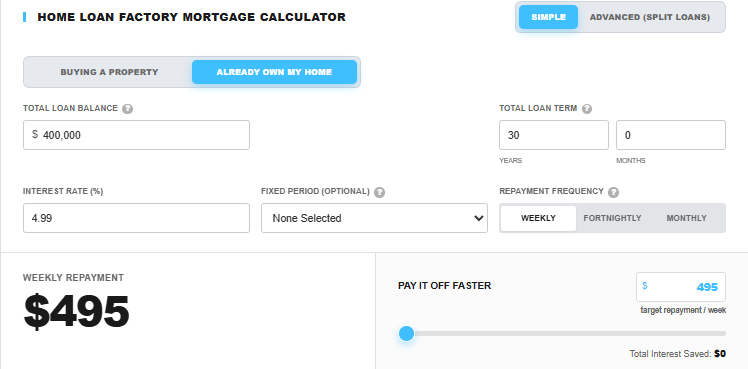
Home Loan Factory Mortgage Calculator
1. Entering Your Loan Amount (Two Ways to Do It)
Our calculator gives you complete flexibility depending on where you are in your home-buying journey. You can choose between two easy options to tell the calculator how much money you need:
Option A: Enter the Loan Amount Directly - select ‘Already own my own home’. If you already have a pre-approval letter from a bank stating exactly how much money they are willing to lend you, simply type that number right into the field.
Option B: Enter the Purchase Price & Deposit - select ‘buying a property’. If you are still house hunting, you can input the estimated price of the home and your deposit amount. The calculator will automatically subtract your deposit from the price to figure out your true loan size.
The Quick Deposit Shortcuts: To make things even faster, we’ve built quick-select buttons for standard deposit sizes: 5%, 10%, 15%, and 20%. Simply type in the purchase price, click your deposit percentage, and the calculator handles the math instantly.
2. The Loan Term vs. The Fixed Period Dropdown
This is one of the most common points of confusion for first-home buyers, so we designed our calculator to make the distinction clear:
The Loan Term: This is the total lifespan of the mortgage—how long it will take to pay the entire debt down to zero if you only make the minimum payments. In New Zealand, the standard starting term is 30 years.
The Fixed Period Dropdown: This dropdown lets you note down the specific fixed term you are considering (like 1, 2, or 3 years). Note: Selecting a period here is simply a notation tool to help you track your different scenarios—it does not dynamically change the underlying math of the calculator. To lock in actual, real-time rates for a specific fixed term, you will need to speak with your adviser.
3. The Interest Rate
Interest rates change constantly, and unless you are using a specific bank that allows you to lock in a rate early, your final interest rate usually isn't locked in until your contract goes completely unconditional.
If you are just running estimates and aren't sure what numbers to plug in, skip the generic finance sites and head straight to our built-in Mortgage Rates Comparison Tool. We track the latest standard advertised rates across all major Kiwi lenders so you can grab an accurate, up-to-date baseline.
Tip for Low-Deposit Buyers: If you used our shortcut buttons to select a 5%, 10%, or 15% deposit, remember that banks view low-equity loans as higher risk. You will want to manually add a little extra (usually around 0.50% to 0.75%) to the bank's advertised special rates to account for a standard Low Equity Margin.
4. Repayment Frequency
There is a massive myth in the property world that simply changing your mortgage to weekly or fortnightly repayments will magically shave years off your 30-year loan.
The truth? The frequency of your standard repayments has very little mathematical effect over a 30-year term unless you are actively choosing to pay more than the bank's minimum requirement.
Our general advice is simple: Match your mortgage repayments to your pay cycle. If your employer pays you fortnightly, set the calculator to fortnightly. It makes household budgeting infinitely easier and ensures the mortgage money leaves your account the moment you get paid.
5. The Secret Weapon: The Early Repayment Slider
Once the calculator generates your standard repayment amount, it’s time to play offense using our Early Repayment Slider.
This feature allows you to see exactly how much time and money you can save by contributing just a little bit extra above the bank's mandatory minimum payment. Sliding an extra $20, $50, or $100 a week into the calculator will instantly visually demonstrate how fast you can crush your mortgage.
The Golden Rule of Mortgages: The absolute best time to use this slider is in the early years of your loan. Because your mortgage balance is at its absolute highest when you first buy a house, the vast majority of your standard repayments go toward paying off interest rather than the actual house.
By adding extra payments right from the start, you chip away at the principal balance before the interest has a chance to compound and snowball against you. A tiny bit of discipline in years 1 through 5 can save you tens of thousands of dollars and knock years off your loan term.